Long-Running Flows

Catch runs that run too long — now, and last night

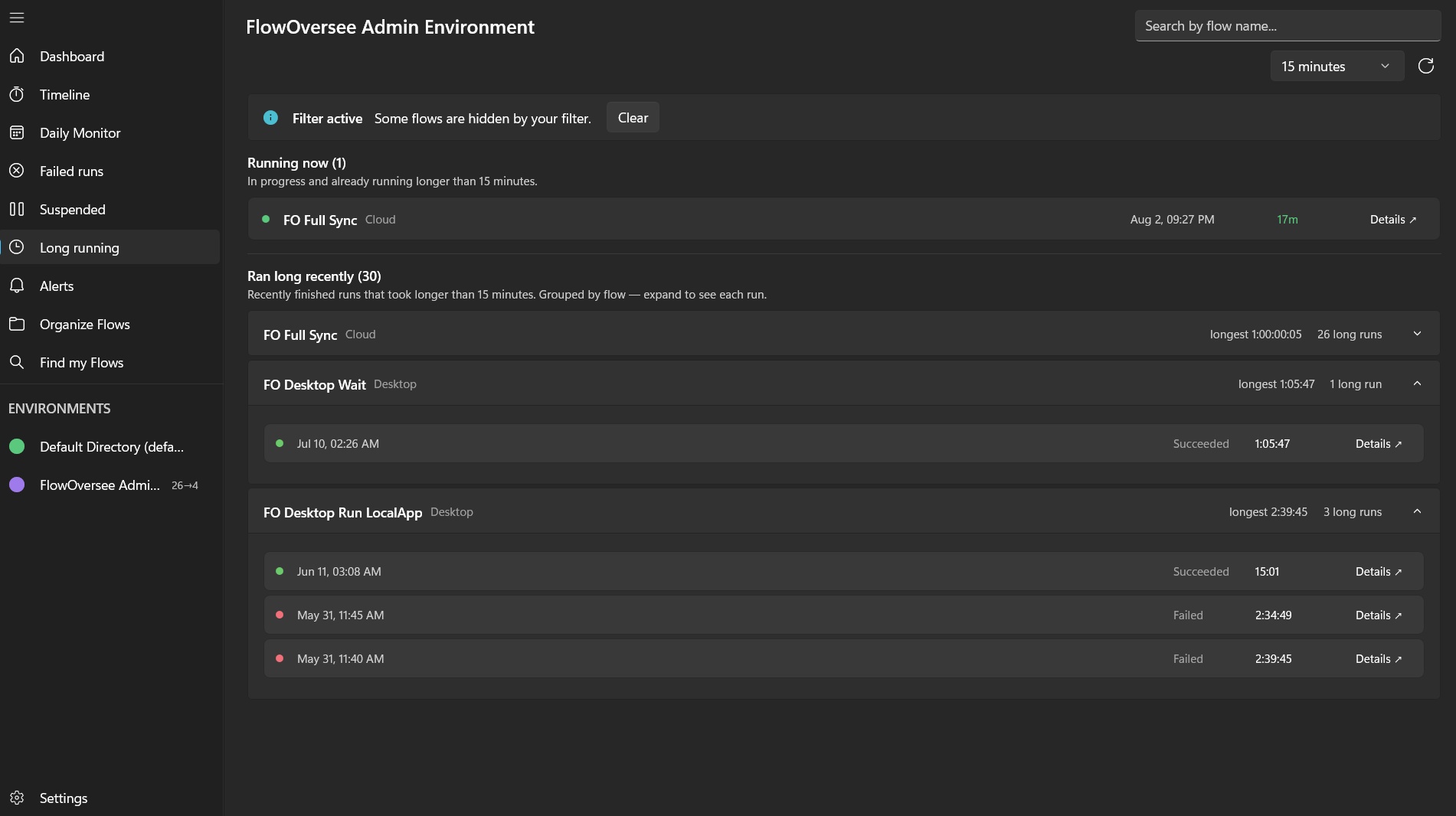
A hung flow doesn't fail. It doesn't alert. It just quietly never finishes — while everything downstream waits. FlowOversee's Long Running page shows every run past your threshold while it's still running, and keeps a record of the ones that finished late.

Power Automate does the automating — FlowOversee adds the overseeing. It's a read-only companion to a platform we think is great: nothing in your flows changes, you just see them better.

Watching runs by hand

  • What's currently running lives in each flow's own run history — checking across flows means opening them one at a time.
  • A stuck run raises no failure, so nothing notifies anyone while it hangs.
  • A job that took four hours instead of twenty minutes is easy to miss after the fact — unless you happen to open that flow's history.

With FlowOversee

  • One list of every run currently in progress past your threshold — 5 minutes to 1 day, your call.
  • A "Ran long recently" section for runs that finished over the threshold, grouped per flow with counts.
  • Duration spikes can also be flagged automatically by Needs attention, judged against each flow's own baseline.

Running long right now

Pick what "too long" means for your world — 5 minutes for quick API flows, hours for heavy desktop automations — and FlowOversee surfaces every run still in progress past that line, with the elapsed time counting against it.

  • Threshold dropdown from 5 minutes to 1 day — remembered between sessions
  • Search the list, and your include/exclude flow filter applies here too
  • Open a flow's details to see its run history without leaving the app
Show runs longer than30 minutes ▾
FO Data Cleanup
Cloud · started 6:02 AM
2h 41m elapsed
FO Run Weekly Report
Desktop flow · started 7:15 AM
1h 28m elapsed
FO Customer Onboarding
Cloud · started 8:09 AM
34m elapsed

And what ran long recently

The overnight job that took four hours and eventually finished? By morning it looks like a success. The "Ran long recently" section keeps those runs visible — finished runs that went over your threshold, grouped by flow so a repeat offender shows once, with a count.

  • Finished runs over the threshold, grouped per flow with a count
  • Expand a flow to see each long run and how long it actually took
  • Current and recent sections filter independently, so live triage and history digging don't fight
FO Nightly Export 3 long runs
Mon 2:00 AM3h 58m
Sun 2:00 AM4h 12m
Sat 2:00 AM2h 47m
FO CRM Contact Sync 1 long run
Common questions

Long-running flows, answered

How do I see which Power Automate flows are running too long right now?
FlowOversee's Long Running page lists every run in the environment that has been in progress longer than the threshold you pick — with the elapsed time counting against it. Choose anything from 5 minutes to 1 day, and the list updates to match.
Can I see runs that took too long but already finished?
Yes. Alongside the live view, a "Ran long recently" section collects finished runs that went over your threshold, grouped by flow with a count — so a job that quietly took four hours overnight shows up in the morning, even though it eventually completed.
What thresholds can I set for long-running detection?
Anything from 5 minutes to 1 day: 5, 10, 15, or 30 minutes, or 1, 2, 4, 8, or 12 hours, or a full day. FlowOversee remembers your choice between sessions, and the current and recent sections each have their own filters.
Works together

Pairs well with

Coming soon

Know before downstream does

FlowOversee is coming to the Microsoft Store. Try the app in the interactive demo right now — no install, no sign-in, simulated data.