Alerts & Needs attention

The moment a flow breaks, Windows tells you

Nobody wants to discover a failed flow from the person waiting on its output. Turn on FlowOversee's background alerts, leave the app open — even minimized — and a Windows notification arrives when a run fails, a flow is suspended or turned off, or something just looks off.

Power Automate does the automating — FlowOversee adds the overseeing. It's a read-only companion to a platform we think is great: nothing in your flows changes, you just see them better.

Without a watcher

  • Failure emails land per flow and get buried under everything else in the inbox.
  • Suspensions and turned-off flows send no signal at all — they're found by accident.
  • "Ran fewer times than usual" is invisible until someone counts.

With FlowOversee

  • A Windows toast for failures, suspensions, turned-off flows, and needs-attention findings — each with its own switch.
  • You pick the environments and the pace — every 2 minutes up to hourly, independent of the dashboard.
  • Everything also lands on the in-app Alerts page with a sidebar badge — and it's all off by default.

Alerts that come to you

The background monitor keeps watch on your schedule, not the other way around. It signs in silently with your existing session — no surprise prompts — and when you've been away, it catches up on launch and flags what appeared since your last session.

  • Four trigger types — run failed, flow suspended, flow turned off, needs attention — individually switchable
  • Check every 2 minutes up to hourly, per your choice, on the environments you choose
  • Every alert lands on the Alerts page too, so nothing depends on catching a toast
FlowOversee notification icon FlowOversee now
Flow run failedFO Nightly Export — Admin Environment
FlowOversee notification icon FlowOversee 12m
Flow suspendedFO Web Check — left its active state
Background alerts
Check every5 minutes
Monitored environments2 of 3

It spots what looks off — before you go looking

Needs attention is FlowOversee's anomaly detector. It learns each flow's own normal rhythm — no thresholds to set up — and reports deviations as plain facts, automatically once your flows have loaded.

  • Five checks: missed runs, fewer runs than expected, broken success streaks, failure rates above the flow's own baseline, and duration spikes
  • Plain-language findings — facts, never guesses
  • Triage on your terms: snooze, mute, or acknowledge any finding; choose which checks run and how sensitive they are
Needs attention
  • FO Ticket Escalation — 12 runs expected in the last 24h, 0 observed
  • FO Nightly Export — Succeeded 18 runs in a row, then failed
  • FO Data Cleanup — 5 of the last 10 completed runs failed; 1 of the previous 40 failed
  • FO Customer Onboarding — Typically completes in 04:00; the last run took 13:20
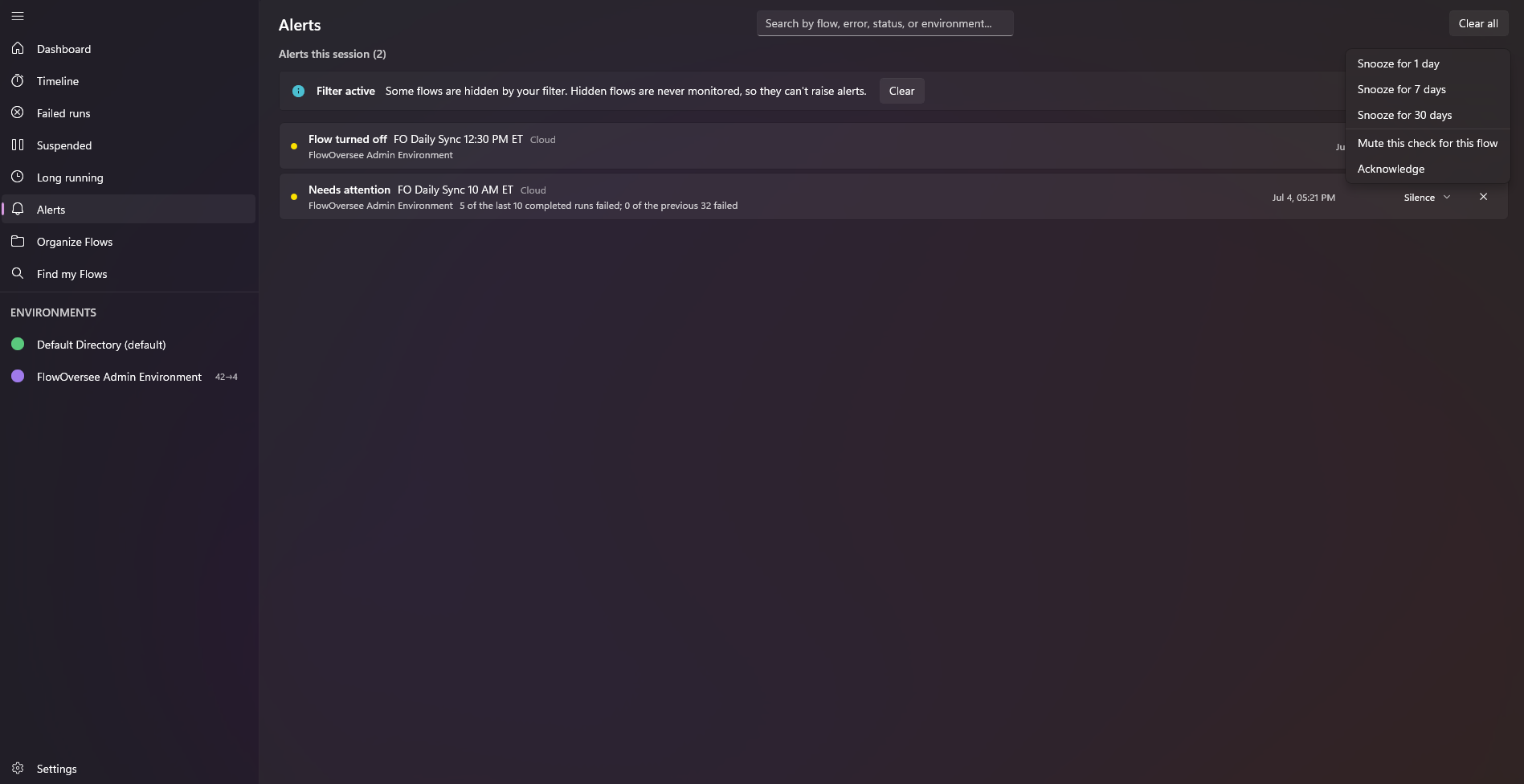
FlowOversee — Alerts
FlowOversee Alerts page listing flagged failures, suspensions, and anomalies with a sidebar badge

The Alerts page: everything the background monitor has flagged, collected in one place.

Common questions

Alerts, answered

How fast will I know when a Power Automate flow fails?
As fast as your check interval. FlowOversee's background monitor watches the environments you choose on the pace you choose — from every 2 minutes up to hourly — and sends a Windows notification the moment a check finds a failed run, a suspension, a turned-off flow, or a needs-attention finding.
Does FlowOversee have to be running for alerts to work?
Yes — leave the app open, even minimized, and the background monitor keeps watch. It works quietly: background checks sign in silently using your existing session and never pop up prompts while you're doing something else. And when you launch the app after time away, it catches up and flags new findings that appeared since your last session.
What is "Needs attention" and how does anomaly detection work?
FlowOversee baselines every flow's own normal rhythm — no thresholds to configure — and runs five checks against it: missed scheduled runs, fewer runs than expected, broken success streaks, failure rates above the flow's own baseline, and run-duration spikes. Findings are reported as plain facts, like "Succeeded 18 runs in a row, then failed."
Will alerts spam me?
Everything is off by default and opt-in per trigger — failures, suspensions, turned-off flows, and needs-attention each have their own switch. You pick the environments and the pace, needs-attention findings can be snoozed, muted, or acknowledged, and you choose which of the five checks run and how sensitive they are.
Works together

Pairs well with

Coming soon

Find out first

FlowOversee is coming to the Microsoft Store. Try alerts in the interactive demo right now — no install, no sign-in, simulated data.