The four things worth watching
Failed runs are the loud one — a run ends in an error and the platform records it. Flows that did not run are the quiet one: a turned-off or suspended flow, or a trigger that filtered everything out, produces no failure — just an absence. State changes are the cause behind many of those absences: a flow gets suspended or turned off and its schedule stops mattering. And long runs sit in between: still running, not failed, while everything downstream waits. A monitoring routine earns its keep when it covers all four, not just the first.
The toolkit built into Power Automate
- Run history — every cloud flow in the portal keeps one, covering the last 28 days by default (admins can adjust retention); open a run for step-level detail. The place to dig into any one flow.
- Activity — one feed of recent run activity across your flows, mirrored as push notifications by the mobile app.
- Failure emails — flow owners get notified about failures by email, including repair-tips messages with suggested fixes.
- Desktop flow monitoring — the Monitor section covers the RPA side: each desktop flow run with status, duration, and machine, plus activity dashboards.
- Error-handling branches — inside any flow, a step configured to run after failure can post to email or Microsoft Teams with exactly the context your team wants.
- Application Insights — for enterprise setups, cloud flow telemetry can be exported to Azure Application Insights for alerting and analysis alongside other systems.
What FlowOversee adds: the whole environment, at a glance
FlowOversee is a Windows companion app that puts all four watch-items in one place, for every flow you can access — cloud and desktop side by side. It opens to a dashboard of the whole environment, sorted and counted by status. A timeline draws the day's runs — and the next 24 hours of scheduled ones — as bars on a 24-hour strip. The Daily Monitor marks your chosen flows off against their actual run history every day, so a miss is flagged instead of unnoticed. Optional alerts raise a Windows toast for failures, suspensions, and turned-off flows, and needs-attention checks learn each flow's own rhythm to flag failure streaks, duration spikes, and expected runs that never came.
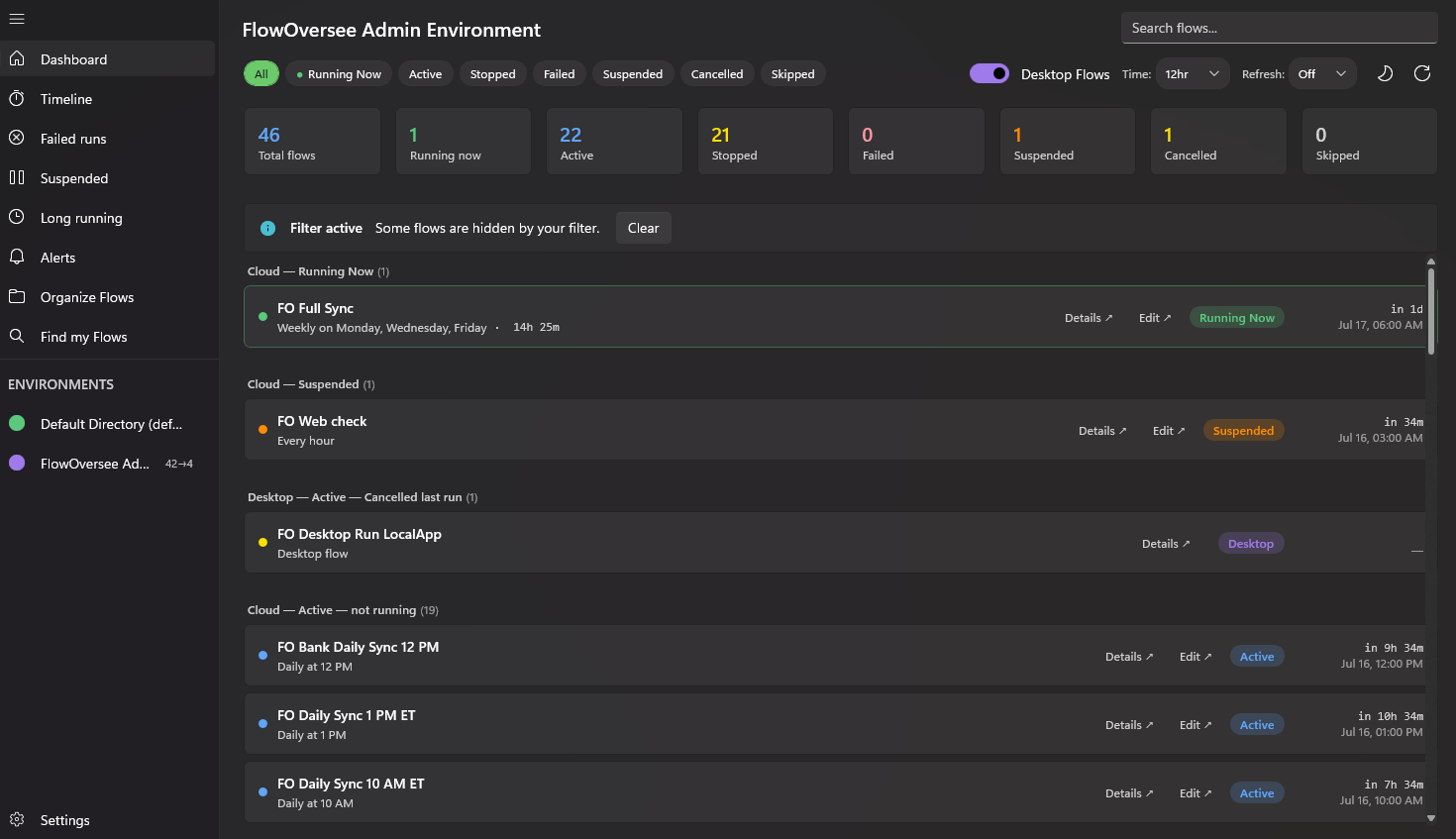
The whole environment on open: every flow, every status, cloud and desktop together.
It is read-only, private, and local: FlowOversee signs in with your own account, talks only to official Microsoft endpoints, and sends nothing anywhere else — no server, no account with the developer, no telemetry. Explore the full feature set or try everything in the interactive demo.